
Prepare and check
See sell charges, optional buy costs, expected profit and margin before sending.
See the margin before you send the quote, and the profit after the job is billed.
No card required. Sign in with Google to get started.
Already have bill numbers? How to migrate.
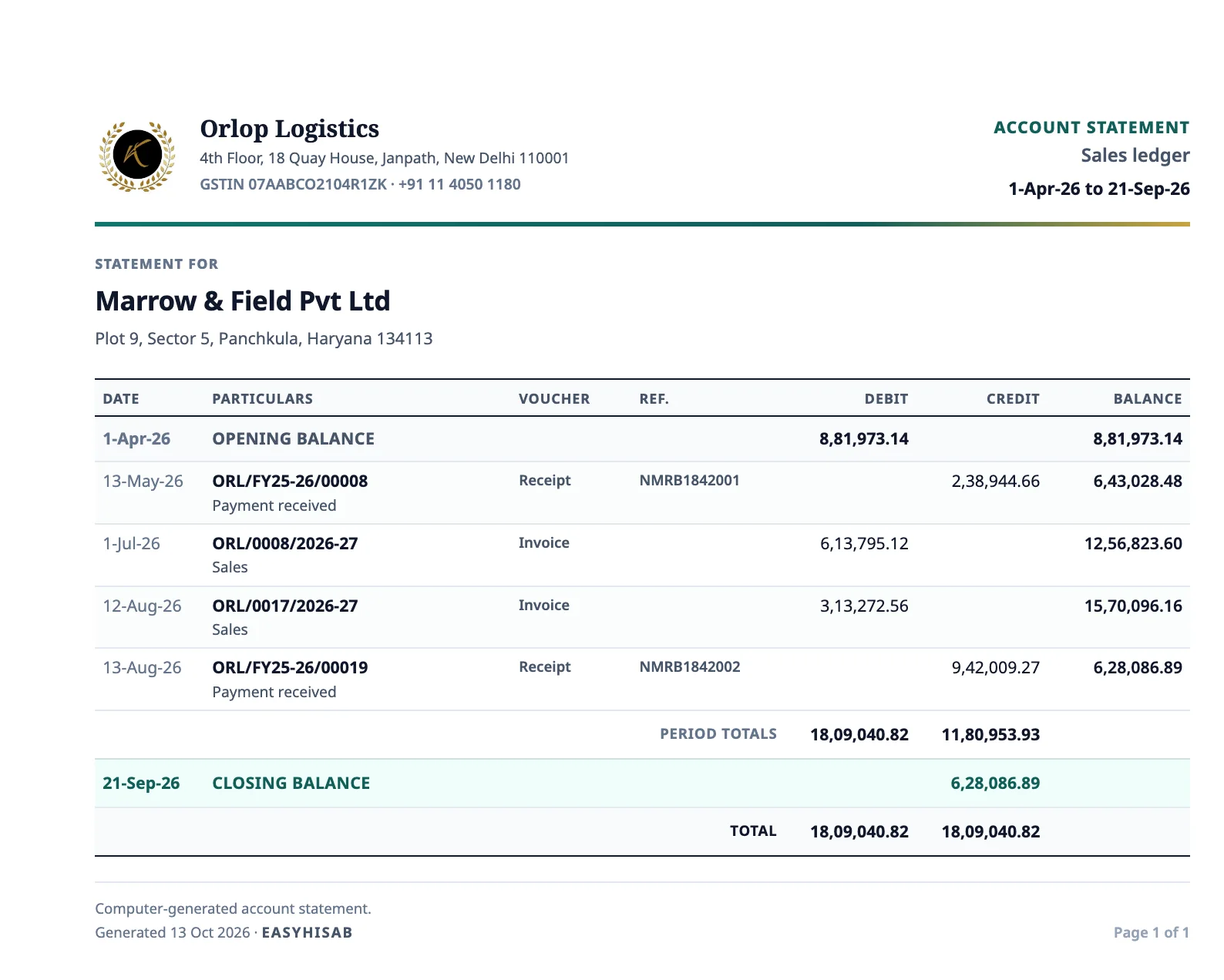
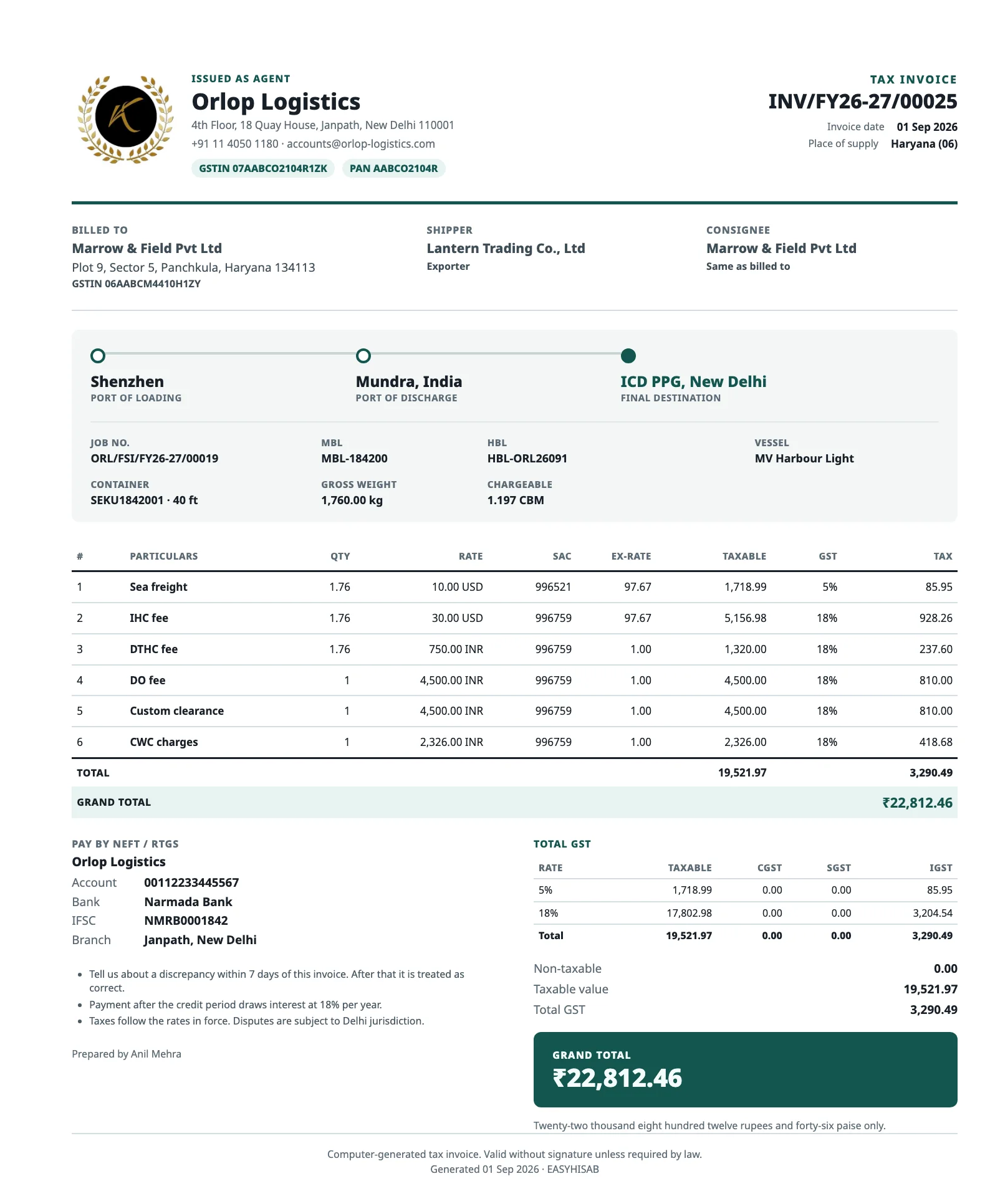
Compare selling charges with optional buy costs, then send a customer-ready PDF. Save your usual charges and terms to prepare the next quote faster.
See sell charges, optional buy costs, expected profit and margin before sending.
Set validity, issue a quote number and email the PDF with your saved Reply-To and team CC.
Record confirmation and carry charges and expected costs into the job. Create the invoice separately.
Sea, air, and road jobs keep the shipment on one record. The customer bill and the vendor cost come from that job.
Sea import and export jobs keep the house bill, master bill, vessel, carrier, and ports, with ETD/ATD and ETA/ATA. An enabled import job can send a one-time Bill of Entry number request when that date is due. The email does not file the customs entry.
Sea freight on the jobAir import and export jobs keep the HAWB and MAWB, the carrier, and the same arrival and departure dates. The Bill of Entry number request is available on enabled air imports as well.
Air freight on the jobA domestic road job records pickup, optional loading, drop, vehicle number, and the consignment note.
Road jobsThe invoice uses the shipment already on the job. Vendor costs sit on the same job. GST TDS changes what is still to collect or pay.
Issue the bill from the job in rupees or a foreign currency, then email the PDF. An issued bill stays as it was. A credit note records the correction.
Record the shipping line and other vendor costs, including a foreign currency converted to INR. A debit note adjusts that cost.
Enter the GST TDS a customer deducts on a receipt. On a vendor cost sheet, you can book 2% of the taxable value when you confirm it.
GST TDSJob profit uses issued bills and confirmed costs. The same view shows who still owes you, and the figures your CA asks for.
₹2,12,000
Profit · 41% margin · before GST
₹1,28,000
₹64,000 overdue · unpaid invoices, GST included
For your CA: sales and purchase registers, GST sales summary, GST and 194C TDS register, receipts and payments, party balances and payables aging. See all nine reports
Invite staff by email, start with view-only access, then choose what each person can do.
Send an email invite. They join your business with Google.
Start new team members with read-only access. Grant more when they’re ready.
Choose Clerk, Approver or Full desk—or set permissions one by one.
Issue a draft directly, or require a team member to review it before you issue the bill.
You open the sea, air, or road job once. The bill lives on that job.
Already using a numbering sequence? We can continue it from your last invoice number for the current financial year.
Open the trial with your Google account.
Send your last invoice number. Include your last job number too if you want that sequence to continue.
We’ll continue the invoice and job sequences you ask us to migrate.
More staff, more companies, bigger customers. The same desk keeps up.
Clerk, Approver or Full desk, with an approval step before a bill is issued and a history of every change.
Roles and approvalEach company or GSTIN runs as its own freight business with its own numbering and team, under one sign-in.
More than one companyOne customer with offices in several states, each location billed with its own GSTIN.
Customer locationsRecord a receipt once and match it to bills, oldest first. Anything extra stays on account.
Receipts and paymentsSet a books start date and bring in only the bills still open. Balances agree with your CA from day one.
Switching guideSales, purchases, GST, TDS and bank movements, each as a CSV for the dates you choose.
Freight reportsWhat happens to the bills, parties, and jobs you enter, in plain words.
No new password to create. Each staff member joins your business with their own Google account.
The app and our servers talk over HTTPS.
EasyHisab does not sell personal data to third parties.
Privacy policyAsk for account closure and data deletion at any time. Tax records the law requires are kept.
Data deletionGuidance for choosing freight software, working alongside Tally, handling TDS, switching mid-year, and running quotes, costs and collections.
What the freight desk does, what the books do, and how the two work together.
Read the guide TAXCustomer GST TDS on receipts, vendor GST TDS and 194C on cost sheets, and the TDS register.
Read the guide SWITCHINGBooks start date, opening bills and advances, and your first month on a new system.
Read the guide15 days for one freight business. No card. Sign in with Google.
One freight business No card required Sign in with Google
Try EasyHisab Freight free for 15 days. Sign in with Google and choose Freight / Logistics.
Create freight quotations, convert confirmed quotes into sea, air, or road jobs, and manage customer invoices and vendor costs with a clear view of what each job earns.
Yes. Issue a numbered freight quotation first. When the customer confirms, record the confirmation and convert the quote into an open job. This does not issue an invoice.
Sign in with Google at app.easyhisab.in and choose Freight / Logistics. You’ll get 15 days to try it with one freight business. To see it first, ask for a demo.
Yes, and that is by design. EasyHisab runs the freight desk: quotations, jobs, freight bills, vendor costs, receipts and job profit. Your CA keeps the books and files GST as usual, working from the sales and purchase registers, GST sales summary and TDS register EasyHisab prepares.
Yes. On a customer receipt, enter the cash and the GST TDS they deducted, then match it to the GST portal. On a vendor cost sheet, you can book 2% of the taxable value when you confirm it, and record filing, deposit, and the certificate. It changes what is still to collect or pay. It does not change the bill’s GST or the job profit, and EasyHisab does not file the return. See GST TDS.
Yes. Invite up to five staff per freight business. Choose their role or set permissions yourself. See how.
A quotation shows expected profit before GST. Job profit and Freight P&L use issued freight bills, credit notes, confirmed vendor costs, and debit notes; expected costs stay out until confirmed. Choose this month, the last 30 days, this financial year, or your own date range. The dashboard also shows billed, cost, margin, outstanding and overdue amounts. Receivables aging groups open customer bills by how late they are. Open a customer or vendor statement to review its transactions and balance. For your CA, download a sales register for selected dates or a GST sales summary for one tax month. These are reports, not GST return filing. See the reports.
Yes. Choose sea or air import or export, or a road job for domestic transport. You can also add a category code of your own.
Yes. Quotations, customer bills, and vendor cost sheets take charges in INR, USD, and other currencies you turn on, such as EUR, AED, or CNY. Each line converts to INR at the exchange rate you enter, and GST and job profit are worked out in rupees.
For an enabled sea or air import job, EasyHisab can send a one-time email requesting the Bill of Entry number when the job’s ETD/ATD date is due. This is an email request, not customs filing.
Sales and purchase registers, the monthly GST sales summary, a TDS register covering GST TDS and 194C, receipts and payments for the bank statement, party balances, and receivables and payables aging. Each downloads as a CSV for the dates you choose. See the reports.
A new account starts at 00001. To continue your current sequence, email us your last invoice number.
For shop billing, see EasyHisab GST Billing.